Skip to content

Ayonix VMS Plugin

AI Video Analytics. Inside Your VMS.

More Intelligence. Greater Value. No Workflow Change.

Add Ayonix analytics to the video infrastructure your operators already use. Turn live and recorded video into searchable AI metadata, operational events and actionable alerts.

A security operations room with operators reviewing multiple camera views on a video wall
Interface illustration. Not measured data.
Vehicle counting
Active
People counting
Active
Face recognition
Configured
Gender / age
Aggregate
  • People & vehicle counting
  • Face recognition
  • ANPR / LPR
  • Gender & age analytics
  • Live AI overlays
  • AI events & alarms
  • Forensic search
  • API / webhooks

Supported platforms

Start from the VMS you already run.

Ayonix is designed to sit beside your video platform rather than replace it. Select a platform to see how the integration is shaped.

Compatibility validation available. Tell us your VMS and version and Ayonix will confirm what the integration supports for your installation.

Core analytics

Five capabilities. One plugin layer.

Each capability is configured per camera and surfaces into the VMS as metadata, an event or both.

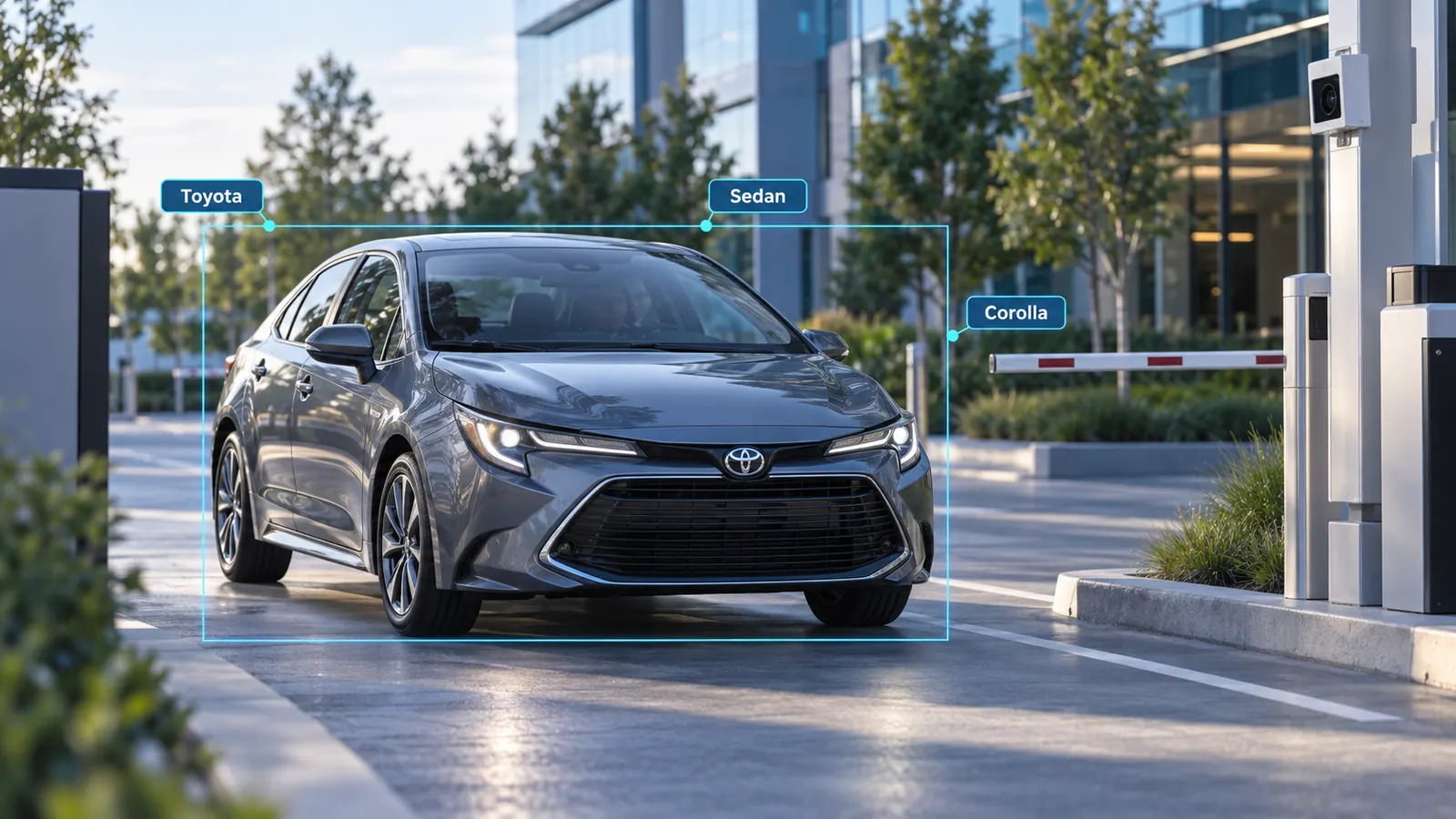
Vehicle counting

Count, classify and understand vehicle movement in real time.

Counts by class and direction, zone activity and traffic flow β€” with an optional ANPR workflow where reading a plate is lawful and useful.

  • Count and classification by configured class
  • Direction and virtual lines
  • Zones and traffic-flow review
  • Optional ANPR workflow
Request a Demo
Vehicles moving through a monitored access lane
Vehicle Β· Access lane

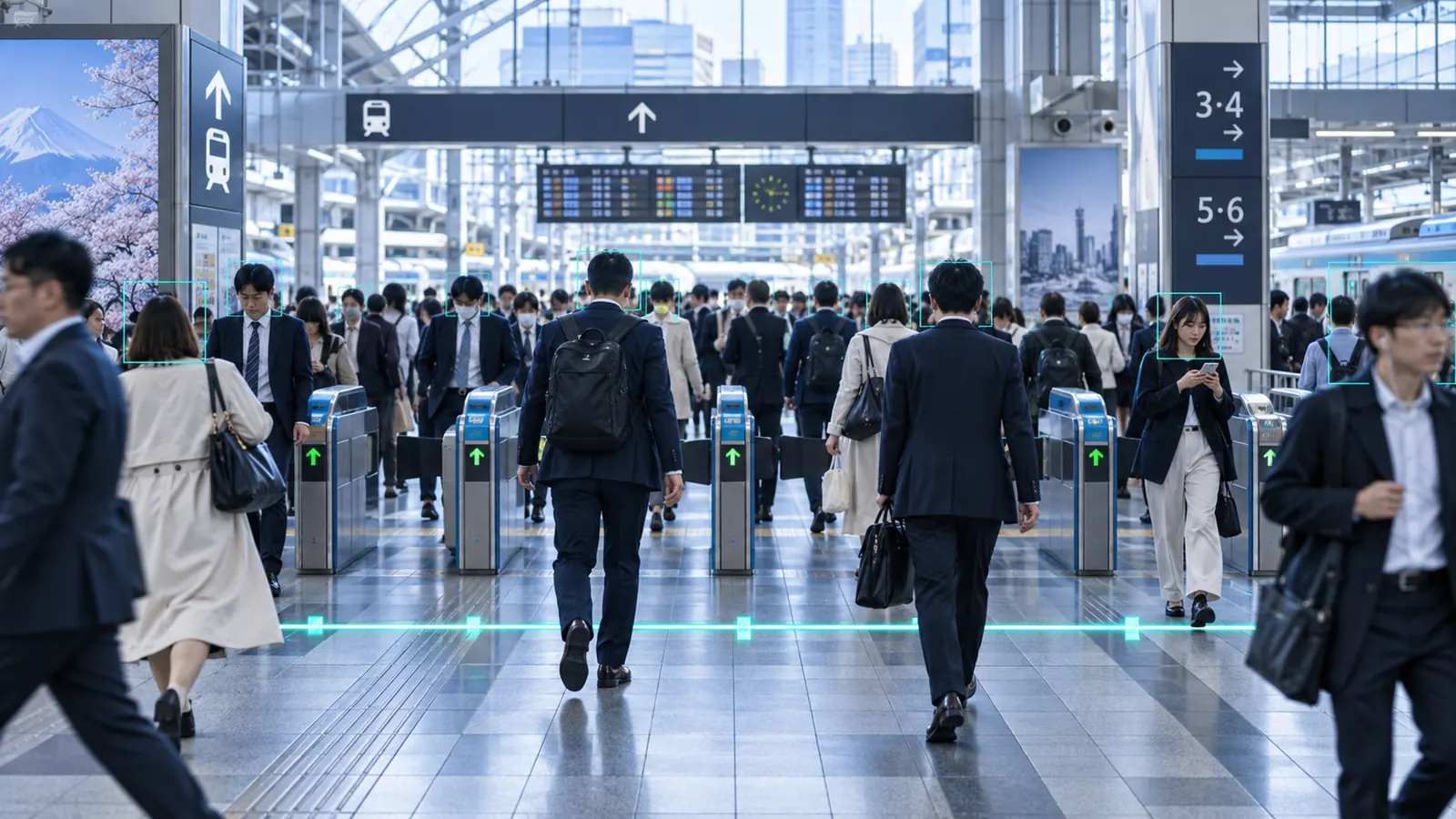
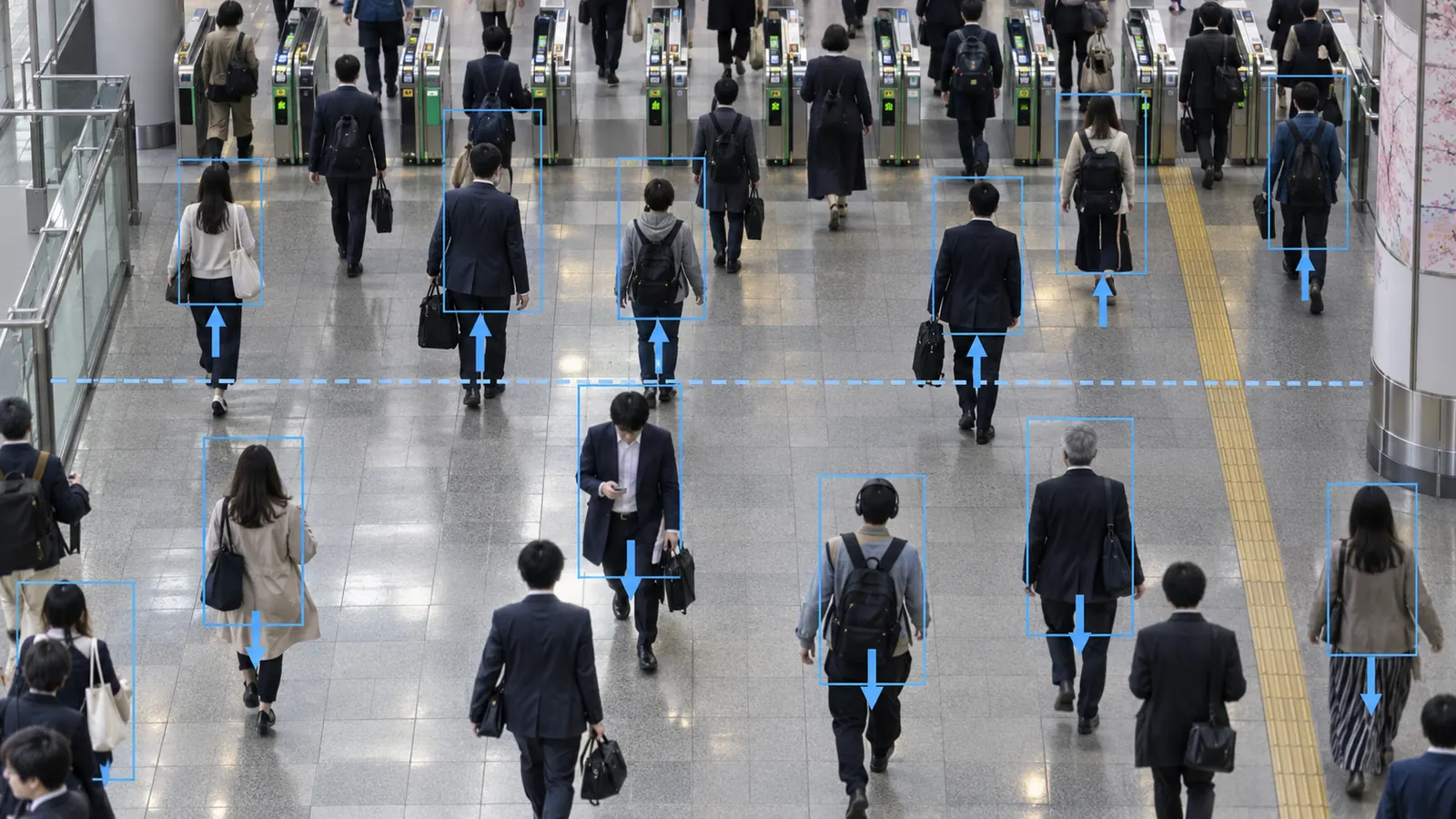
People counting

Understand foot traffic, occupancy and movement across your sites.

In and out counts, live occupancy, dwell, queue and zone activity, with thresholds that raise an event before a limit is passed.

  • IN / OUT counting and occupancy
  • Dwell and queue analytics
  • Zone activity by area
  • Crowd thresholds and alerts
Request a Demo
People moving through a monitored building entrance
People Β· Entrance

Face recognition

Generate configured identity-match events and connect them to video evidence.

A watchlist or allowlist event carries the camera, the time and a snapshot, and links straight to the recorded video for a person to confirm.

  • Watchlist and allowlist workflows
  • Camera and time context on every event
  • Event snapshot as evidence
  • One-click link to playback and search
Request a Demo
An operator reviewing an identity-match event against recorded video
Face event Β· Operator review

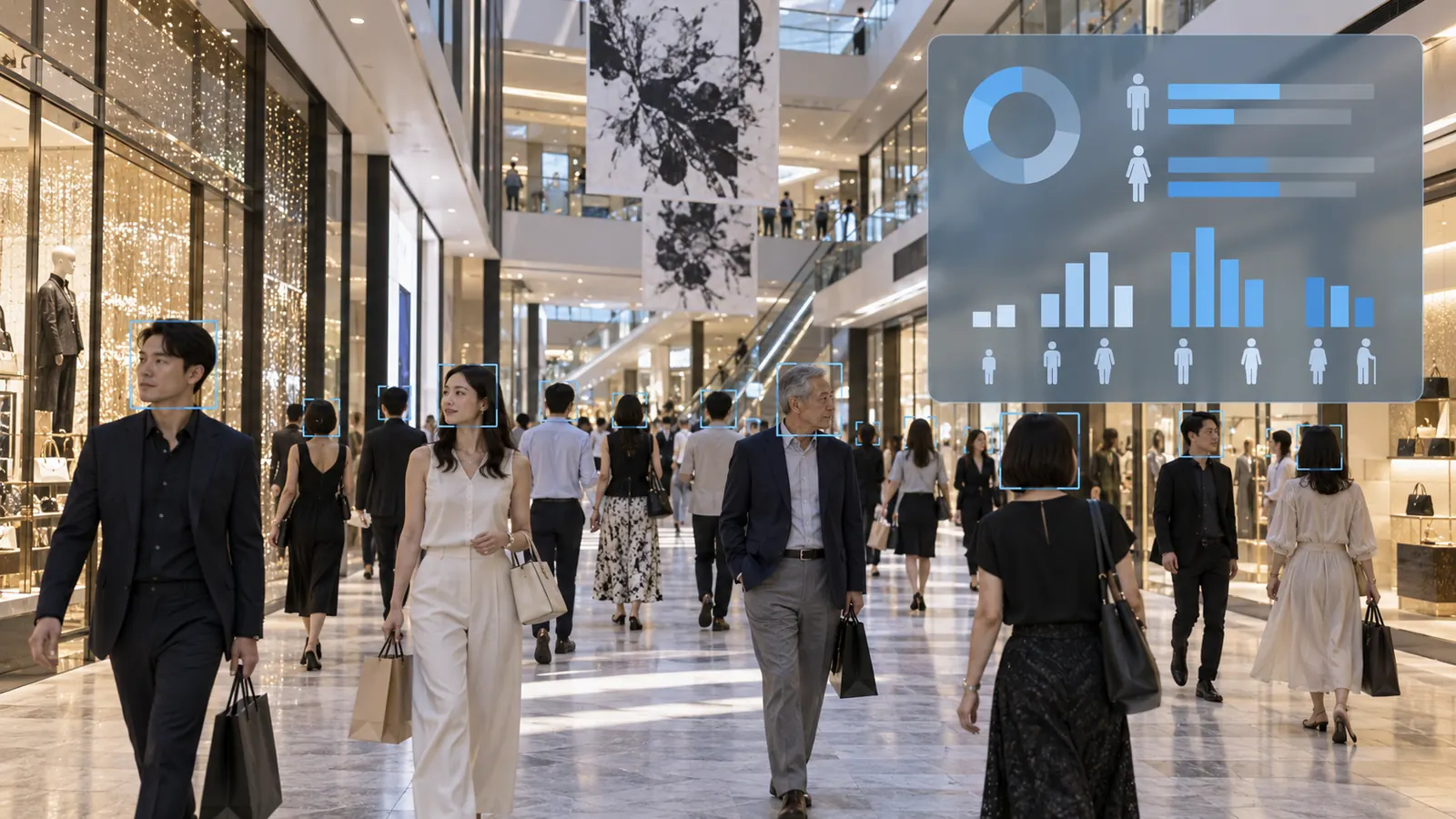
Gender / age analysis

Turn configured demographic estimates into aggregate operational insight.

Age-band and gender-presentation estimates, aggregated over time for planning. Estimates about a crowd, not facts about a person.

  • Configured age ranges
  • Gender-presentation estimation
  • Visitor trends aggregated by period
  • Dashboard and export
Request a Demo
Aggregate audience composition shown as an analytics summary
Demographics Β· Aggregate

Face surveillance

Connect face events across cameras to investigation workflows.

A face event on one camera becomes a thread an investigator can follow across the estate, filtered by camera, site and time.

  • Face event timeline
  • Multi-camera search
  • Camera, site and time filters
  • Snapshot and playback linkage
Request a Demo
Multi-camera event review across a monitored site
Investigation Β· Multi-camera

Operator workflow

From pixel to action, without leaving the VMS.

The plugin's job is to fit the sequence an operator already follows, not to add a second console.

  1. Detect

    Objects found and tracked in the live stream.

  2. Understand

    Class, attributes and rule context resolved.

  3. Alert

    An event or alarm raised in the VMS workflow.

  4. Investigate

    Snapshot, camera and time on the event card.

  5. Search

    Metadata filtered across cameras and periods.

  6. Export

    Evidence, CSV or report out of the system.

  7. Automate

    Rules and webhooks drive the next action.

Plugin capabilities

What the integration actually does.

Which of these are exposed depends on the VMS and the integration surface it offers, and is confirmed for your installation.

In the live view

  • Live AI overlays
  • Metadata on live and recorded video
  • Object class filtering
  • Lines and zones
  • Direction rules
  • Dwell and loitering thresholds

Events and alarms

  • AI events mapped to camera and time
  • Native-style event and alarm workflow
  • One-click go-to-playback
  • Event snapshots as evidence
  • Occupancy and crowd thresholds
  • Rules and actions

Search and investigation

  • AI metadata search
  • Face event search where configured and lawful
  • Vehicle and ANPR event search where supported
  • Multi-camera timeline
  • Reports, CSV and API export
  • REST API and webhooks

Operations

  • Health and status monitoring
  • Central configuration
  • Edge and on-premise processing
  • Multi-site scalability

Per-platform integration

How it fits each platform.

The same analytics layer, shaped to the integration surface each vendor publishes.

Built for the XProtect Operator Workflow.

  1. XProtect video
  2. Ayonix analytics
  3. Metadata / analytics event
  4. Event & alarm workflow
  5. Smart Client investigation
  6. Playback / rules
  • Live analytics overlay in the view the operator already watches
  • Event and alarm panel entries with thumbnail and details
  • Camera and time on every event, with go-to-playback
  • Metadata timeline and search filters
  • Rules and action concepts for downstream automation
Discuss XProtect Integration

These describe integration concepts. They are not a statement of certification, marketplace listing or compatibility with any specific vendor release β€” confirm your VMS and version with Ayonix.

Event automation

Turn AI Events into Actions.

A rule is a sentence: when this happens, and this is true, do these things.

  • Occupancy exceeds a configured threshold
  • Vehicle crosses a counting line
  • Watchlist event on a configured camera
  • ANPR allowlist or blocklist event
  • Loitering passes a dwell threshold
  • Intrusion into a protected zone
Rule preview. Illustrative values.
WHENPerson enters Zone A
ANDSchedule = Closed
THEN
Create alarmBookmark videoWebhook

Actions connect to the workflows your VMS and external systems actually expose. Where a workflow is not available on a platform, it is scoped as an integration option rather than assumed.

Integration architecture

Where the plugin sits.

  1. IP cameras (ONVIF / RTSP)
  2. VMS / recording infrastructure
  3. Ayonix AI engine / AIBOX
  4. AI metadata + events
  5. VMS client / alarm workflow
  6. External systems
External systems
  • Access control
  • Doors & gates
  • Parking & barriers
  • PSIM
  • BMS
  • SIEM / SOC
  • BI
  • Database
  • REST API
  • Webhooks
  • Customer applications

Deployment

Three ways to run the analytics.

Chosen on latency, bandwidth and where your policy allows video to go.

  • VMS / on-premise AI

    Analytics on a server inside your own environment, alongside the recording infrastructure.

    Best for enterprise and centralized deployments
  • Ayonix AIBOX / edge AI

    Inference beside the cameras, for low latency and reduced bandwidth, with video staying local.

    Best for low-latency local processing
  • Distributed / multi-site

    Edge analytics at each site with central event, search and reporting architecture where supported.

    Best for estates and networks

For VMS administrators

Know the analytics layer is actually running.

An analytics plugin that fails quietly is worse than none, because the operator stops looking. These are the signals an administrator should expect to see.

  • AI service online / offline
  • Per-camera analytics status
  • Inference service status
  • Event pipeline status
  • Last event time
  • Version information
  • Logs and diagnostics
  • Reconnect and retry state

Which of these signals are exposed, and where, depends on the specific VMS integration.

Compatibility

Check My VMS.

Rather than publish a matrix that goes stale on somebody else's release schedule, Ayonix checks your installation. These are the details that decide the answer.

  • VMS and version
  • Camera count
  • Camera codec, resolution and FPS
  • Analytics required
  • Deployment: server / AIBOX / hybrid
  • GPU or CPU environment
  • Event integration required
  • Metadata search required
  • External systems

Where it runs

The same plugin, different questions.

  • RetailFootfall, occupancy, queue and aggregate audience mix.
  • TransportationPassenger flow, vehicle movement and peak planning.
  • Smart citiesTraffic counting, public-space flow and zone analytics.
  • AirportsGround vehicles, stand activity and passenger flow.
  • RailwayPlatform and concourse flow, track-side activity.
  • ManufacturingZone headcount, vehicle paths and restricted areas.
  • LogisticsTruck and forklift movement, dock and yard activity.
  • Commercial buildingsOccupancy, entrances and restricted zones.
  • EducationCampus flow, entrances and after-hours perimeter.
  • Government & public facilitiesPerimeter, access and authorized watchlist workflows.

Buyer questions

Answers before the integration call.

What is a VMS analytics plugin?

Software that adds AI analysis to a video management system without replacing it. The VMS keeps doing recording, storage and operator workflow; the plugin adds detection, metadata and events inside that existing workflow.

How does AI integrate with a VMS?

The analytics engine reads the video the VMS already handles, produces metadata and events, and returns them through the integration surface the VMS publishes β€” so they appear as overlays, events, alarms and searchable metadata rather than in a second application.

Can AI analytics work with existing CCTV cameras?

Often yes. Suitable RTSP or ONVIF streams can be used. Camera placement, angle, resolution, lighting and scene density determine what a given view supports, so representative footage is reviewed before a deployment is specified.

Can AI metadata be searched in recorded video?

Where the VMS exposes metadata search, yes β€” recorded video can be filtered by object class, event type, camera, zone, direction and time instead of scrubbed by hand. The available filters depend on the platform.

Can VMS plugins generate alarms?

Yes. Analytics events can be raised into the platform's event and alarm workflow, so they reach operators through the same panel, acknowledgement and escalation path as any other alarm.

Can Ayonix count people and vehicles?

Yes. People counting covers in/out, occupancy, dwell, queue and zone activity. Vehicle counting covers counts by configured class, direction, zones and traffic flow, with ANPR as a separate module.

Can Ayonix integrate face-recognition events with a VMS?

Configured identity-match events can be surfaced with camera, time and a snapshot, linked to recorded video for a person to confirm. This should be deployed only where the use case, policy and law support it.

Can Ayonix integrate ANPR events?

Plate events can be raised into the VMS event workflow and used for allowlist, blocklist and gate workflows. Plate formats vary by country and region, so supported formats are confirmed against footage from your site.

Can Ayonix run on-premise or at the edge?

Both. Analytics can run on a server inside your own environment, or on AIBOX beside the cameras for lower latency and less bandwidth. Distributed deployments combine edge analytics with central search and reporting.

How do I check VMS compatibility?

Tell Ayonix your VMS and version, camera count, codec and resolution, the analytics you need, the deployment model and any external systems. Ayonix confirms what the integration supports for that installation rather than publishing a matrix that ages on the vendor's release schedule.

Keep your VMS

Keep Your VMS. Add Intelligence.

Tell us your VMS, camera count and analytics requirement. Ayonix can help define the integration architecture and evaluation path.